Internet

Xfinity is not always the culprit of slow Ethernet/Wi-Fi speeds…

Dell XPS 8950 – Windows 11 Pro
Killer E3100G 2.5 Gigabit Ethernet Controller
Netgear Modem: CM3000 (2.5 GB port)
Netgear Router: RS280S (2.5 GB port)
Ethernet cables: 1 foot CAT-6a

I upgraded to the 2 GB DL/250 Mbps UL 5-Year plan (mid-split). What follows are the things I did to get the speeds Xfinity promised. My Wi-Fi speeds were spot on, but the very slow Ethernet DL speeds were the issue for my setup. I got a great deal of excellent advice from r/HomeNetworking Reddit group.

  • Created a Windows ‘System Restore Point’ prior to any changes.
  • I did a ‘deep uninstall’ of Killer Intelligence Center (what Dell’s come with).
    • Uninstalling this also help reduce overall CPU usage.
  • Uninstalled the Killer drivers for the card and after a reboot… I let Windows install the ‘default’ Windows certified drivers.
  • Unplugged the modem and router and restarted the PC.
    • Plugged only the modem back in and rebooted the PC.
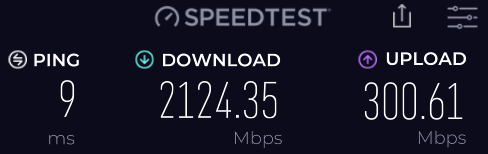
    • Discovered that the direct connect speeds were in line with promised speeds of around 2 GB DL and UL speeds close to 300 Mbps.
  • I rebooted the PC and then plugged in modem and router in that order.
    • Saw that hardwired speeds with router back online… were not as fast as modem only speeds e.g., the issue still existed.

I decided to revisit an app I has used years ago… ‘TCPOtimizer’. I downloaded ‘TCPOptimizer 4’ from speedguide.net

  • Ran the app as ‘Administrator’, selected my Ethernet Controller in the dropdown window.
  • Set the slider for ‘Connection Speed’ to 100+Mbps.
  • Under the ‘Choose Settings’ I selected ‘Optimal’ and noted the changes that populated the settings above the ‘Choose Settings’ section.
  • Selected ‘Apply Settings’ and rebooted.

Using TCPOtimizer 4 (at least for me and my situation) solved my slow Ethernet speed connections. Your mileage may vary, use at your own risk.

I hope this helps!
Comcast/Xfinity couldn’t care less…

So in an effort to start saving money across the board, I’ve started cutting back on services. In fact this WordPress site is another cost saving move, I hosted my original website with GoDaddy ($100 a year savings).

One way to do this if you’re using a service like Comcast/Xfinity is to ditch the rental fee for your WiFi router/modem. Over the course of a year, you could be looking at a savings of $150 or more.

So if you do your shopping right, you can buy your own modem and it pays for itself in the first year alone. Along with owning your own WiFi router/modem, you also have the ability of making sure the “firmware” is always up-to-date, something a rented device won’t be able to do. So that alone brings added security.

So why the drama about Comcast doesn’t care? Well I bought a new device and took the old one into Comcast. Explained I bought my own and won’t be needing the rental. The clerk asks… “does the new device you bought have a phone jack?” I responded “no.” Clerk does some calculations and comes back stating that my new monthly bill would be $221. OK, so I stop rental of a device and because the new device doesn’t have a “phone jack” you’re going to charge me considerably more? “Yes, the plan you had (some triple type plan with phone service I never used), included phone service.” OK I said, so how much just for internet at my current speed?

Clerk states it would be about $96 a month. I said… I’ll be back within the hour. Went home, collected the DVR box, remote, power cables, and headed back to the store.

So I didn’t go there with the intention of getting rid of my television/cable service. But because of the plans, they lost out on $75 or more of revenue from me. The clerk could have easily said… “You know what, I’m gonna’ forget you said your new device doesn’t have a phone jack,” basically they would just be losing the WiFi router/modem rental fee. I would have stayed with my internet and cable TV plan none the worse for me or Comcast.

So, I kept the internet and subscribed to YouTube TV (had an Amazon Firestick already), I get all of my live local channels and more and I’m still saving over Comcast/Xfinity.

Bottom line, Comcast/Xfinity knows for a fact their losing television customers. So they’ve stop fighting, they stopped trying to up-sell, they stopped trying to keep customers happy. This is another reason why a lack of competition is never a good thing. In my area I can’t get more than seven OTA (over the air) channels with one of the indoor style antennas, of which none of them are worth anything, unless you only watch HSN and Ion. So the only other choice would have been Century Link (sub par speeds) and/or some type of satellite dish, which seem to be going out of business as well e.g., AT&T Dish etc.

Just do a little research on “cutting cords” and prepare yourself so when your provider doesn’t want to play ball with you, you can take your own ball home and play a different game!